Query optimization recommendations
API Performance Optimizations
Section titled “API Performance Optimizations”If your queries are taking too long, consider optimizing them by reducing complexity, avoiding unnecessary fields, and leveraging caching where possible. Use tools and techniques such as ACF Local JSON and defining GraphQL types to enhance performance.
ACF: Use Local JSON
Section titled “ACF: Use Local JSON”Local JSON is a helpful feature that saves field groups, post types, taxonomies, and option pages as JSON files within your theme. Similar to caching, it dramatically speeds up ACF and allows for version control over your field settings. Each time you save a field group, post type, taxonomy, or options page, a JSON file will be created or updated with the settings for the item being saved. By default, the JSON file will be named using the unique key for that item.
For more instructions on implementing and customizing Local JSON for ACF, visit this page.
Typically, we recommend making changes to ACF field groups in local development and deploying the updated JSON files to WP Engine. No sync is required on WP Engine as long as changes to field groups are not being made there.
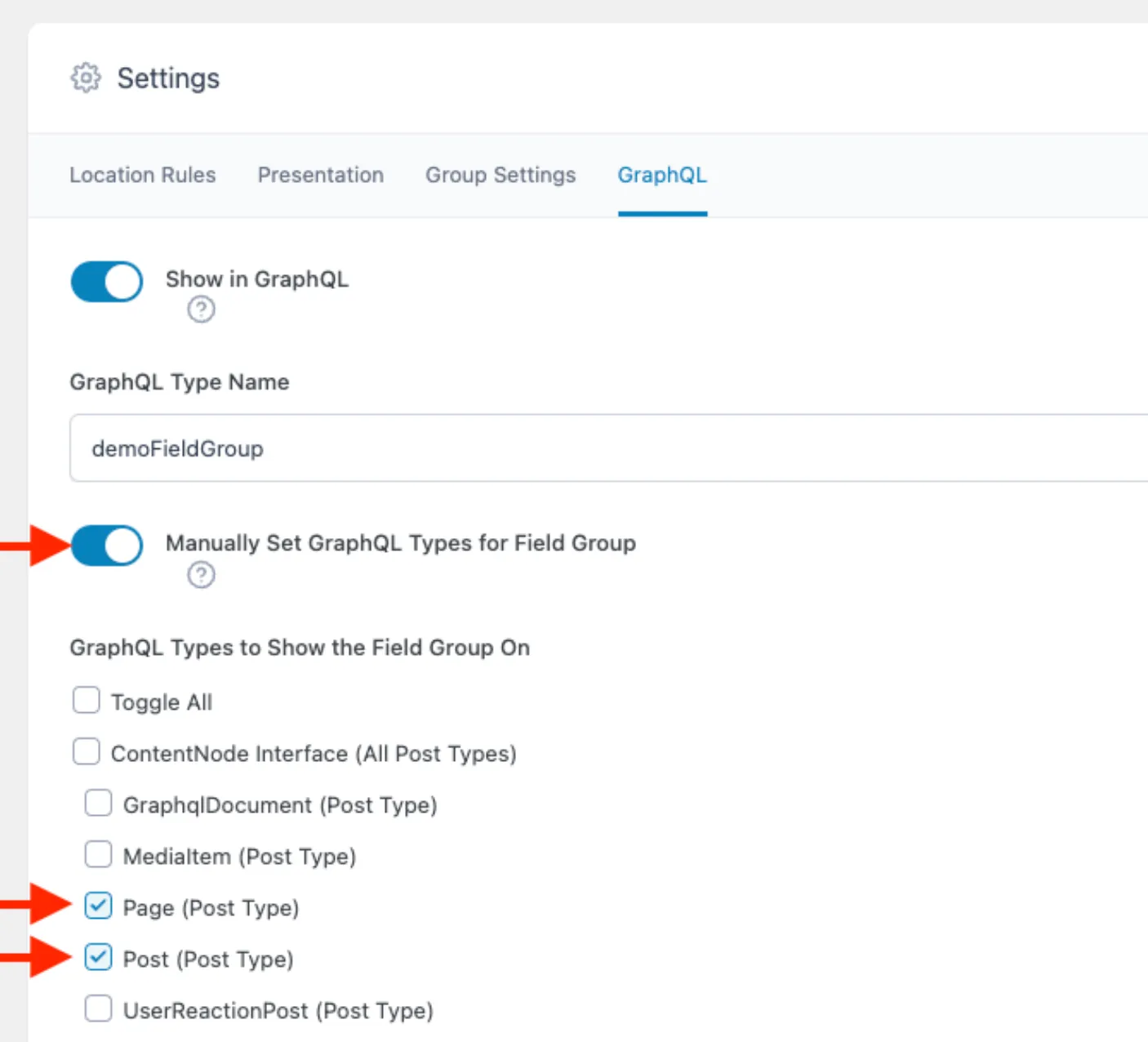
ACF: Define graphql_types on each field group
Section titled “ACF: Define graphql_types on each field group”If you are using GraphQL in your API requests along with the WPGraphQL plugin and its WPGraphQL for ACF extension, you can improve performance by manually setting graphql_types for each field group. This bypasses expensive logic and improves the performance of GraphQL queries involving field groups.
To do this, visit the GraphQL section in your ACF plugin settings and configure the graphql_types field for each group.
Reduce or Eliminate Meta Queries
Section titled “Reduce or Eliminate Meta Queries”Meta queries have a notorious reputation within the WordPress world due to the impact they have on performance (both in headless and monolithic architectures). These queries search for metadata and can be slow and resource-intensive.
In building out your data models, consider how you may avoid the need for such queries by replacing them with taxonomies (including utility taxonomies) or ACF relationship fields instead.
For example, you may initially consider a “Feature on Homepage” boolean field for blog posts and a meta query to find all blog posts where that field is set to “true”.
An alternative, more scalable solution may use an ACF relationship field on the Homepage of “Featured Blog Posts”. Another approach could be to use a tag/category taxonomy with a term of “featured”. For a site with a large number of blog posts, both of the alternatives would scale much better than the initial boolean field approach.
API Cache Hit Optimizations
Section titled “API Cache Hit Optimizations”If your cache hit rate is too low, optimize by using persisted queries and reducing authenticated requests. This helps improve performance and scalability.
Use WPGraphQL Smart Cache and Persisted Queries
Section titled “Use WPGraphQL Smart Cache and Persisted Queries”By default, most WPGraphQL clients make POST requests. POST requests are not cacheable due to the nature of such requests. In such clients, you can convert those POST requests to GET requests which encodes the query into URL parameters, but many GraphQL queries may be so large that HTTP 414 errors are encountered.
Persisted queries allows your GraphQL client to use a POST request for the initial caching of a request, but then use a hashed ID of a given request so that request URIs are never too long. These queries can then be served from server cache on WP Engine, and the WPGraphQL Smart Cache plugin can intelligently invalidate the appropriate responses as the underlying content changes (e.g. publishing a new blog post or updating a page title). The WP Engine platform currently leverages your WordPress server’s HTTP cache (Varnish) to cache GET requests to WPGraphQL. Our Advanced Network CDN (CloudFlare) does not yet support caching WPGraphQL requests.
We often see folks not using Persisted Queries with cache hit ratios of < 10%. Those who are using Persisted Queries and do not need to make authenticated requests often have cache hit ratios of 60-80%. As you can imagine, this has a dramatic impact on the performance and scalability of your CMS!
For more details on how to implement Persisted Queries in your application, visit the “Persisted Queries” section of this page.
Reduce authenticated requests
Section titled “Reduce authenticated requests”There may be some cases (depending on the nature of a given project) where authentication is required. For example, authentication is required if you need to fetch the cart contents for an e-commerce site or display a user profile page.
However, authentication also means the responses will never be cached. This can have a major impact on the performance of your site! Often, even on sites that require authentication for some content, there is much content that is universal - things such as navigation bar, footer, or blog/page content, etc.
So if your site must have authentication for some queries, make sure you are splitting them apart from the queries that don’t need it and use separate instances of your GraphQL client.
For more info about splitting up your queries, keep reading!
Break apart certain large queries into multiple queries
Section titled “Break apart certain large queries into multiple queries”If you’re using Faust.js, you can break apart certain large queries into multiple queries to increase cacheability. Faust provides a way to pass multiple queries as an array - see example on the bottom of this example.
WPGraphQL Smart Cache creates cache keys that are a combination of the queries plus variables. In some queries such as this one, GetPageData takes in a lot of variables, which isn’t a problem in itself. But that same query is also asking for General Settings, Header, and Footer items which probably do not change very often.
By separating your queries into the smallest logical collections of fields, you can maximize your cache hit ratio by ensuring that query invalidation is as small and specific as possible.